
Popular on Rezul
- The Importance of Community Connections
- 15 Best Areas to Invest in Property UK in 2026 Revealed by New Investor Research
- New Luxury Single Family Homes From $976,990 in Manalapan
- Mike Williams Golf Center Now Open at Georgia's Lanier Islands Resort
- Appliance EMT Launches June "Summer Rescue" Promotion
- Turnkey Michigan City Event Venue Listed for $2.5M in Uptown Arts District
- Denver Senior Real Estate Specialist Vickie Hall Named Metro Denver Representative for Greg Luther's Instant Cash, Full Price Home Sale Program
- West Virginia Leaders Announce Support for Election Integrity Network's Model Election Laws Handbook
- K2 Integrity Acquires RiskFront AI to Deliver AI Automation for Financial Crime Compliance and Risk Operations
- Traian TKD Tractari Auto Iasi: cum transporti legal la RAR o masina fara numere sau cu ITP expirat
Similar on Rezul
- PropAccount.com Adds Prediction Markets to Its Multi-Asset Prop Firm Platform
- Rising star Hip-Hop and R&B Force Della Drops Highly Anticipated New Single, "Throw It"
- Kasinohai Audit: Most Slots Could Be Affected by Finland's Draft Gambling Rules
- RAS AP Consulting Expands AP Governance & Automation Practice and Named Finalist for Heidelberg Materials SAP Vendor & Customer Data Project
- 100+ Episodes In, Liftoff with Keith Newman Tells Founders to Stop Publishing More
- Slotozilla Introduces a Centralized Resource for World Cup Bonus Offers
- Dentists launch independent platform to help practices choose the right technology
- Contracting Resources Group Recognized by The Daily Record as a 2026 In the Lead: Best Women-Owned Businesses Honoree
- America's Workforce Solution Named an OpenAI SMB Channel Partner, Bringing Enterprise-Grade AI to Main Street
- Data Tiles Introduces the Decision-Driven Enterprise to North America
Colorfront Launches New Mac App For Creating Apple Immersive Video
Rezul News/10732872
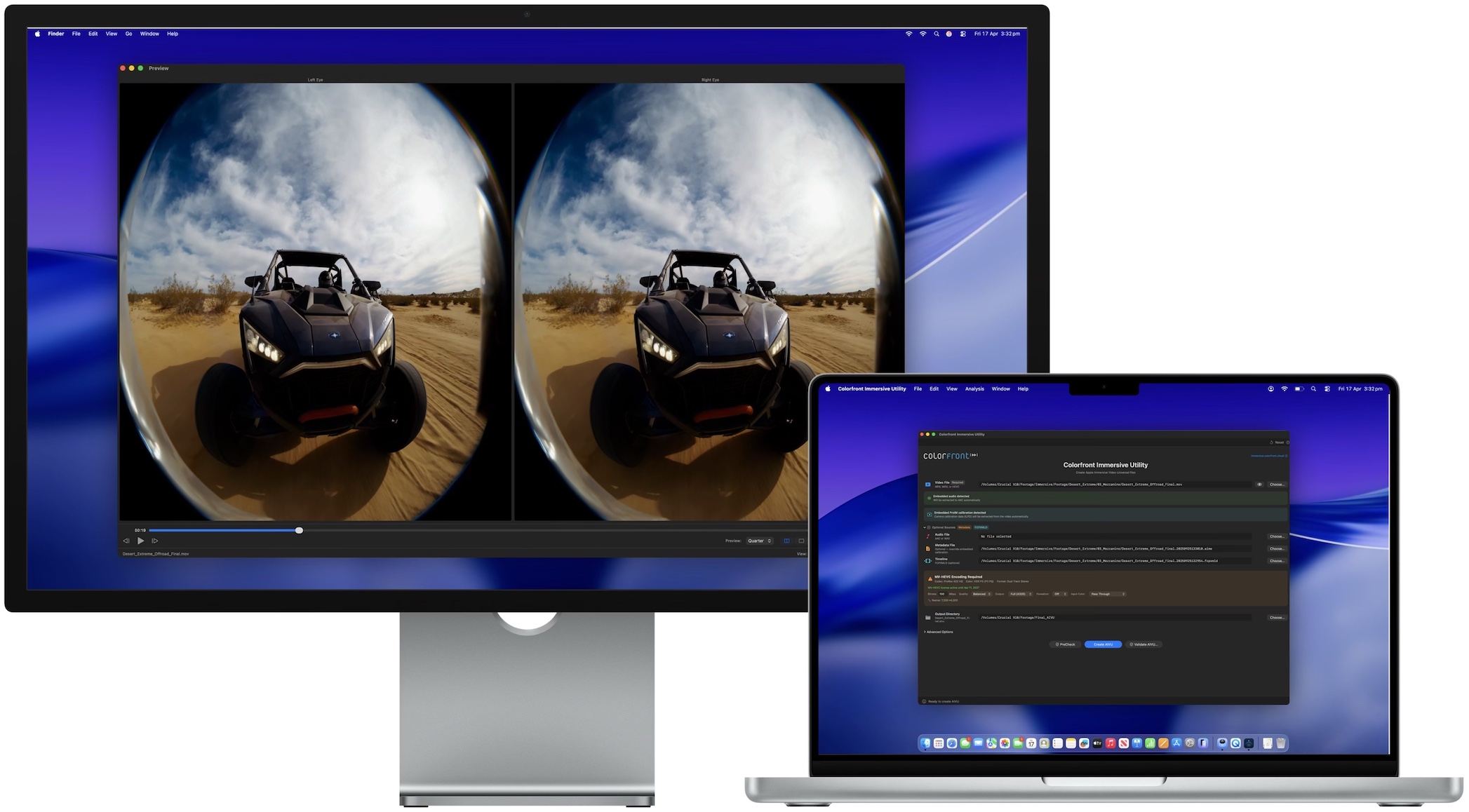
New macOS app converts high-res video and Spatial Audio into Apple Immersive Video (.aivu) files for Apple Vision Pro
LOS ANGELES - Rezul -- Colorfront today announced Colorfront Immersive Utility, a new macOS app that creates Apple Immersive Video files (.aivu) for playback on Apple Vision Pro. The app accepts video in ProRes, MV-HEVC, and other standard formats, pairs it with Spatial Audio and camera metadata, and outputs a single AIVU file ready for distribution.
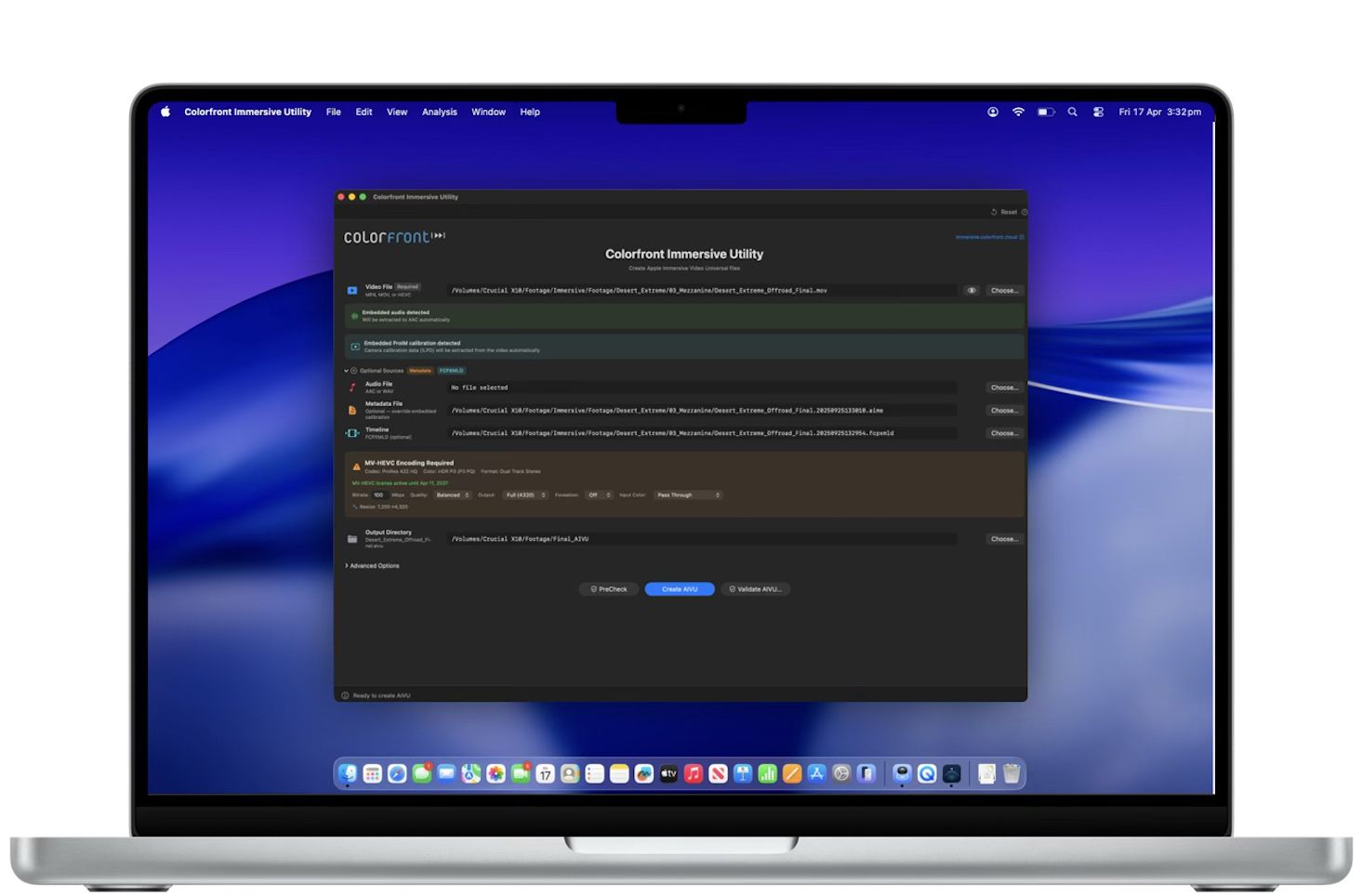
Colorfront Immersive Utility streamlines the process for preparing immersive video content for Apple Vision Pro with a single app. Users select a video file, a metadata file containing camera intrinsics, and an output directory. The app can also auto-detect ILPD calibration data embedded directly in the source video, so a separate metadata file isn't always required. From there, users simply click Create AIVU, and the app handles encoding, audio extraction, and packaging automatically.
"We built Colorfront Immersive Utility to put immersive video production into the hands of every type of creative, whether you're a filmmaker, a documentarian, or a brand telling a story in a completely new medium," said Mark Jaszberenyi, Co-Founder of Colorfront. "Apple Vision Pro has opened up an incredible storytelling canvas, and we wanted to expand access to these tools to as many creatives as possible. The entire pipeline runs on Mac devices with Apple silicon using Metal, so users can go from camera originals to a finished Apple Immersive Video experience."
GPU-accelerated MV-HEVC encoding
When the source video is ProRes or another non-HEVC format, Colorfront Immersive Utility encodes it to MV-HEVC using a GPU-accelerated Metal pipeline. Users can set the bitrate anywhere from 0 to 150 Mbps, choose from six quality/performance presets, and output at full 4320p (4320 x 4320 per eye) or half 2160p resolution. A Lanczos-3 resampling filter handles any resolution conversion needed.
Foveation is built into the same GPU pass. It allocates more resolution to the center of the frame, where the viewer typically looks, while gradually reducing resolution toward the edges. Three levels are available (1.25x, 1.5x, and 2.0x center magnification), and because foveation is integrated directly into the Lanczos resampling filter, there is no additional quality loss from a second processing step.
More on Rezul News
Color space conversion is automatic. The app reads the video's embedded color metadata (NCLC/CICP tags) and converts to P3 D65 PQ at 108 nits, the target color space for Apple Immersive Video. Manual overrides are available for SDR BT.709, HDR10 BT.2020, and other source formats. The entire encoding pipeline processes video at 10-bit precision.
Spatial audio with APAC conversion
Colorfront Immersive Utility automatically detects and extracts embedded audio tracks from the source video to AAC. When a separate WAV file is provided instead, the app converts it to Apple Positional Audio Codec (APAC) for spatial playback on Apple Vision Pro. Three APAC bitrate tiers are available: 384 kbps, 512 kbps (default), and 768 kbps. A configurable fade-in (0 to 60 seconds) can be applied at the beginning of the file.
Multi-shot AIVU with Final Cut Pro XML timelines
The app supports multi-shot AIVU files through Final Cut Pro XML timeline import. Each shot in the timeline references a camera ID, start time, and duration. During AIVU creation, shot boundaries are encoded as setCamera presentation commands in the output file, so Apple Vision Pro can switch between camera perspectives automatically during playback.
Source PreCheck
Before starting any encode, users can run Source PreCheck, a pre-flight validation tool that analyzes video, audio, metadata, and timeline files for potential issues without beginning the creation process. PreCheck grades results by severity: errors that block AIVU creation, warnings worth reviewing, and informational notes. Results are grouped by category (Video, Audio, Metadata, Compatibility). Source PreCheck is available without a license.
Result validation and light level analysis
After an AIVU file is created, the app can validate it with a GPU-accelerated light level analysis that measures MaxCLL, MaxFALL, AvgFALL, and other metrics on every frame of the video. For stereo MV-HEVC content, left and right eye layers are analyzed independently. The validation flags frames that exceed the 108-nit maximum brightness of the Apple Vision Pro display. A parallel analysis mode splits the file in two halves and analyzes them concurrently for roughly 2x faster processing.
More on Rezul News
Validation results can be exported as a multi-page PDF report with light level graphs, shot lists with thumbnails, and the brightest frames from the video. Additional analysis tools include PSNR/SSIM quality metrics for comparing source and encoded files, with per-eye breakdown and overlay charts for stereo content. The app also integrates with Apple Video Quality Tool (AVQT) for no-reference quality scoring of the main eye when AVQT is installed.
Real-time GPU preview
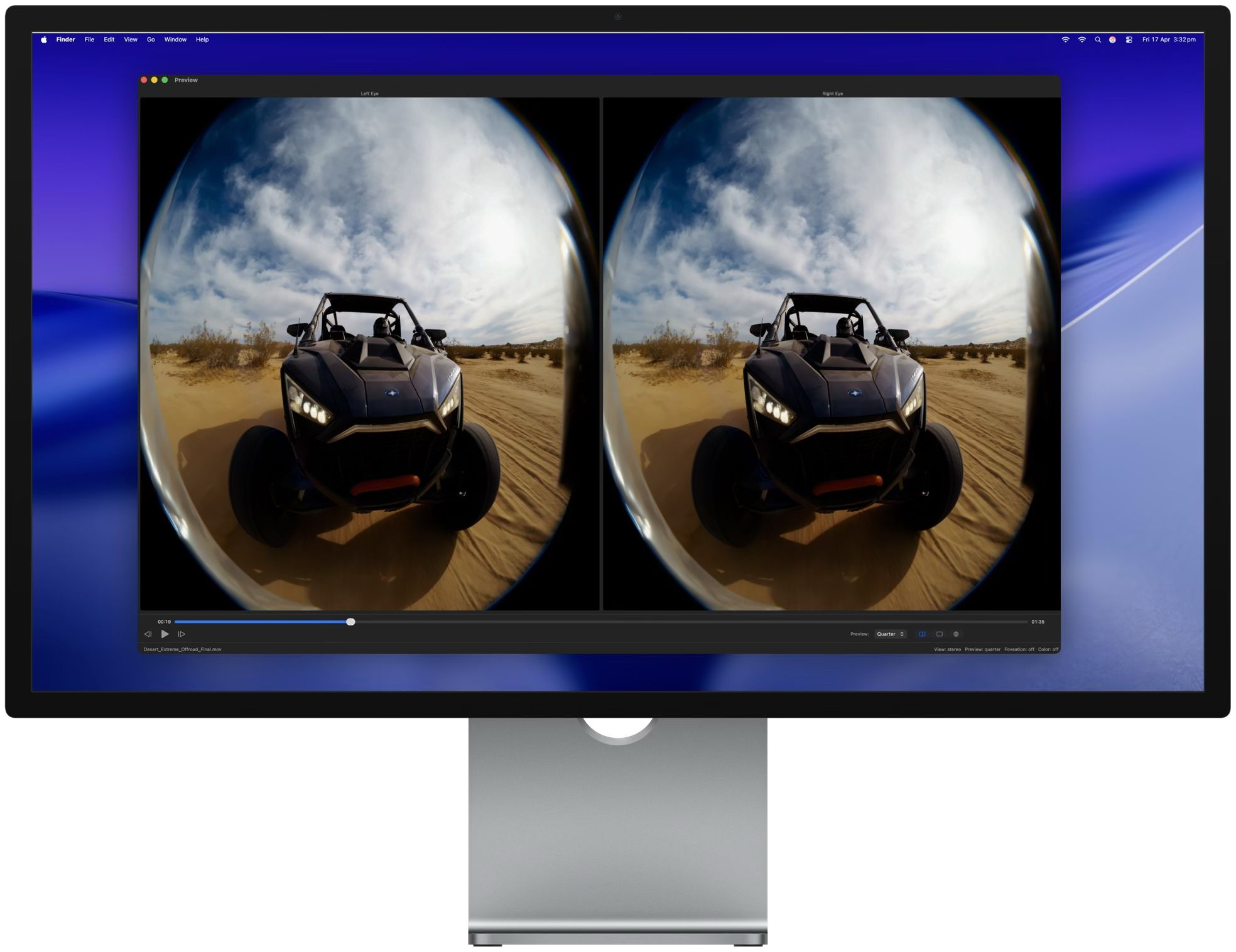
A built-in preview window provides real-time GPU-accelerated playback of the processed video. The preview is synchronized with the main window settings, so changes to foveation level, color space, or other parameters are reflected immediately. View modes include stereo (dual eye), single eye (left or right), and an immersive perspective view. Preview quality can be set to full, half, or quarter resolution.
Pricing and availability
Colorfront Immersive Utility is available today on the Mac App Store. It requires macOS 26.0 (Tahoe) or later, a Mac with Apple silicon (M1 or later required), and at least 16 GB of RAM (32 GB or more recommended for 8K content).
The free tier includes file import and inspection, stereo format and codec detection, real-time preview, MV-HEVC passthrough packaging (no encoding), and Source PreCheck. The MV-HEVC License is a one-year non-renewing subscription at $299 USD. It unlocks GPU-accelerated encoding from ProRes and other non-HEVC formats, result validation with light level analysis, PSNR/SSIM and AVQT quality metrics, and PDF report generation. The license is verified through the App Store and supports Restore Purchases.
For more information, visit immersive.colorfront.cloud.
Link to Colorfront Immersive Utility on Mac App Store
https://apps.apple.com/us/app/colorfront-immersive-utility/id6758009531?mt=12
About Colorfront
Colorfront develops color science and post-production software used by studios and content creators worldwide. The company was founded in Budapest, Hungary. More information is available at www.colorfront.com.
Colorfront Immersive Utility streamlines the process for preparing immersive video content for Apple Vision Pro with a single app. Users select a video file, a metadata file containing camera intrinsics, and an output directory. The app can also auto-detect ILPD calibration data embedded directly in the source video, so a separate metadata file isn't always required. From there, users simply click Create AIVU, and the app handles encoding, audio extraction, and packaging automatically.
"We built Colorfront Immersive Utility to put immersive video production into the hands of every type of creative, whether you're a filmmaker, a documentarian, or a brand telling a story in a completely new medium," said Mark Jaszberenyi, Co-Founder of Colorfront. "Apple Vision Pro has opened up an incredible storytelling canvas, and we wanted to expand access to these tools to as many creatives as possible. The entire pipeline runs on Mac devices with Apple silicon using Metal, so users can go from camera originals to a finished Apple Immersive Video experience."
GPU-accelerated MV-HEVC encoding
When the source video is ProRes or another non-HEVC format, Colorfront Immersive Utility encodes it to MV-HEVC using a GPU-accelerated Metal pipeline. Users can set the bitrate anywhere from 0 to 150 Mbps, choose from six quality/performance presets, and output at full 4320p (4320 x 4320 per eye) or half 2160p resolution. A Lanczos-3 resampling filter handles any resolution conversion needed.
Foveation is built into the same GPU pass. It allocates more resolution to the center of the frame, where the viewer typically looks, while gradually reducing resolution toward the edges. Three levels are available (1.25x, 1.5x, and 2.0x center magnification), and because foveation is integrated directly into the Lanczos resampling filter, there is no additional quality loss from a second processing step.
More on Rezul News
- Lady Liberty Is Coming Home: Historic WWII A-26 Invader Begins Her Final Journey to the Tulsa Air & Space Museum
- New Homes Now Selling at Grove at Mill Creek in Woodstock
- Build and Personalize Your Home from the Ground Up at The Ascent
- The Lashe Announces Limited-Time Sale on Professional Premade Fan Lash Extension Trays
- PropAccount.com Adds Prediction Markets to Its Multi-Asset Prop Firm Platform
Color space conversion is automatic. The app reads the video's embedded color metadata (NCLC/CICP tags) and converts to P3 D65 PQ at 108 nits, the target color space for Apple Immersive Video. Manual overrides are available for SDR BT.709, HDR10 BT.2020, and other source formats. The entire encoding pipeline processes video at 10-bit precision.
Spatial audio with APAC conversion
Colorfront Immersive Utility automatically detects and extracts embedded audio tracks from the source video to AAC. When a separate WAV file is provided instead, the app converts it to Apple Positional Audio Codec (APAC) for spatial playback on Apple Vision Pro. Three APAC bitrate tiers are available: 384 kbps, 512 kbps (default), and 768 kbps. A configurable fade-in (0 to 60 seconds) can be applied at the beginning of the file.
Multi-shot AIVU with Final Cut Pro XML timelines
The app supports multi-shot AIVU files through Final Cut Pro XML timeline import. Each shot in the timeline references a camera ID, start time, and duration. During AIVU creation, shot boundaries are encoded as setCamera presentation commands in the output file, so Apple Vision Pro can switch between camera perspectives automatically during playback.
Source PreCheck
Before starting any encode, users can run Source PreCheck, a pre-flight validation tool that analyzes video, audio, metadata, and timeline files for potential issues without beginning the creation process. PreCheck grades results by severity: errors that block AIVU creation, warnings worth reviewing, and informational notes. Results are grouped by category (Video, Audio, Metadata, Compatibility). Source PreCheck is available without a license.
Result validation and light level analysis
After an AIVU file is created, the app can validate it with a GPU-accelerated light level analysis that measures MaxCLL, MaxFALL, AvgFALL, and other metrics on every frame of the video. For stereo MV-HEVC content, left and right eye layers are analyzed independently. The validation flags frames that exceed the 108-nit maximum brightness of the Apple Vision Pro display. A parallel analysis mode splits the file in two halves and analyzes them concurrently for roughly 2x faster processing.
More on Rezul News
- Rising star Hip-Hop and R&B Force Della Drops Highly Anticipated New Single, "Throw It"
- HomeInspect Launches on Independence Day to Help Independent Home Inspectors Grow Their Businesses
- UK Financial Ltd. Opens Test-Phase Maya 3 Liquidity Pool on Uniswap with DEX Screener Visibility for Market-Smoothing Ahead of CATEX Exchange Launch
- Memphis 4-Bedroom Brick Home — Path to Ownership with $10K Down
- Wagga Trucks set to expand to the Canberra Region as authorised dealer for Volvo, UD & Mack along with Freighter Group Trailers
Validation results can be exported as a multi-page PDF report with light level graphs, shot lists with thumbnails, and the brightest frames from the video. Additional analysis tools include PSNR/SSIM quality metrics for comparing source and encoded files, with per-eye breakdown and overlay charts for stereo content. The app also integrates with Apple Video Quality Tool (AVQT) for no-reference quality scoring of the main eye when AVQT is installed.
Real-time GPU preview
A built-in preview window provides real-time GPU-accelerated playback of the processed video. The preview is synchronized with the main window settings, so changes to foveation level, color space, or other parameters are reflected immediately. View modes include stereo (dual eye), single eye (left or right), and an immersive perspective view. Preview quality can be set to full, half, or quarter resolution.
Pricing and availability
Colorfront Immersive Utility is available today on the Mac App Store. It requires macOS 26.0 (Tahoe) or later, a Mac with Apple silicon (M1 or later required), and at least 16 GB of RAM (32 GB or more recommended for 8K content).
The free tier includes file import and inspection, stereo format and codec detection, real-time preview, MV-HEVC passthrough packaging (no encoding), and Source PreCheck. The MV-HEVC License is a one-year non-renewing subscription at $299 USD. It unlocks GPU-accelerated encoding from ProRes and other non-HEVC formats, result validation with light level analysis, PSNR/SSIM and AVQT quality metrics, and PDF report generation. The license is verified through the App Store and supports Restore Purchases.
For more information, visit immersive.colorfront.cloud.
Link to Colorfront Immersive Utility on Mac App Store
https://apps.apple.com/us/app/colorfront-immersive-utility/id6758009531?mt=12
About Colorfront
Colorfront develops color science and post-production software used by studios and content creators worldwide. The company was founded in Budapest, Hungary. More information is available at www.colorfront.com.
Source: Colorfront
0 Comments
Latest on Rezul News
- Contracting Resources Group Recognized by The Daily Record as a 2026 In the Lead: Best Women-Owned Businesses Honoree
- Woodforest Acceptance Solutions and AlpacaBOSS Launch Partnership
- Titan Pressure Washing Shows The Power Of Complete Exterior Cleaning On A Roof And Concrete Project
- New "Lakeside Picnic Ride" Package in Japan's Lake Chuzenji region of Nikko: July 1- November 30, 2026
- Former MP Shri GV Harsha Kumar Meets AICC President Mallikarjun Kharge
- Two Attorneys at The Stanley Law Group Named to 2026 South Carolina Super Lawyers List
- Equity Real Estate Acquires NRE, Expanding Opportunities for Agents Across Northern Utah
- IGH Naturals Announces Peer-Reviewed HuMOLYTE® Study Published in Frontiers in Nutrition
- Allstream Energy Partners Expands AI-Optimized Website Development Division to Meet Growing Demand in GEO / AEO Services
- America's Workforce Solution Named an OpenAI SMB Channel Partner, Bringing Enterprise-Grade AI to Main Street
- Data Tiles Introduces the Decision-Driven Enterprise to North America
- East Bay Realtor Judy Sin on What Relocation Buyers Seek in Lamorinda
- Disruptor Creations Pioneers New MicroAdventure Series with TravelSpike
- The "For Sale" Sign Has Been There a While. Why Is That House Still Sitting on the Market?
- Treasure Island Vacation Rental Condo Market Reports 77.7% Increase in Median Sale Price as Tourism Reaches Record Levels
- eCopier Solutions Surpasses 3,000 Five-Star Google Reviews and Maintains Perfect Five-Star Rating
- Creative Investment Research Welcomes Supreme Court Decision Protecting Federal Reserve Independence While Calling for Continued Accountability
- Thomas Moore: Two Decades Tackling Nevada's Property Abandonment Crisis
- Thomas Moore: Breathing New Life into a Family's Las Vegas Legacy
- Rebecca Francis Team Ranks Among Top 1.5% of Teams and Agents Nationwide